After Effects scripts by Michael Cardeiro

The compsFromSpreadsheet script for After effects allows you to make multiple versions of your compositions from a spreadsheet. The script goes through your spreadsheet line by line, making a new version of your comp with text layers in the composition receiving text from the spreadsheet automatically
read More...
 |
The Matrix script will take a layer in your comp and break it into pieces. You choose the size of the pieces, whether to animate in order or random, and how long you want the transition to take. Read More... |
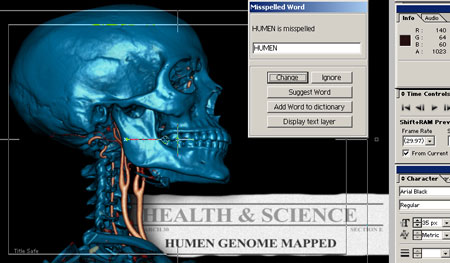 Okay, I admit it...I am a horibal uhm horrible speller; but I thankfully grew up in the age of computer aided spellchecking. Unfortunately, Adobe After Effects
never included this feature. Every time a new release was announced I would anxiously await the arrival of this much needed feature...but it never came.
Okay, I admit it...I am a horibal uhm horrible speller; but I thankfully grew up in the age of computer aided spellchecking. Unfortunately, Adobe After Effects
never included this feature. Every time a new release was announced I would anxiously await the arrival of this much needed feature...but it never came.I finally decided to take matters into my own hands. I used the scripting funtionality in After Effects to build my own spellchecker. The script goes through the currently selected composition, and any precomp contained within and checks every text layer for proper spelling.
If a word is misspelled, the script will give you the opportunity to enter in the propper spelling or get a suggestion. The spell suggestion comes from my website. I originally had the script come up with suggestions but it was taking nearly 15 seconds per word, so I created a script on my website using perl (which gets the suggestion very quickly). When you click on the suggest button, your computer connects to my website and gives it the misspelled word. The script on my website then gives the spell check script a list of suggestions.
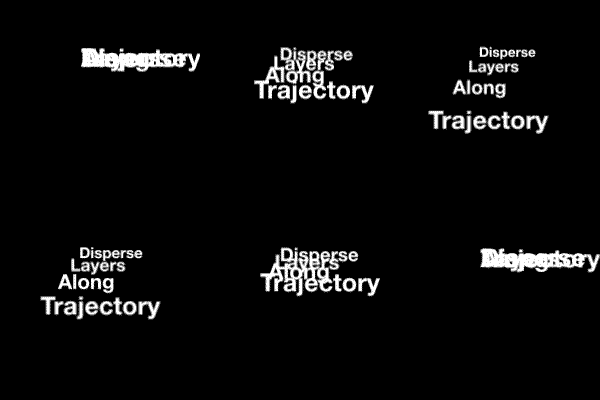 The trajectory script will put two 3d nulls at the bottom of the composition. It will then take every layer in the composition, make them 3d and put a position expression that will distribute all the layers on a line between the two points. A third null is added to control rotation and opacity of the layers...
Read More...
I really don't understand the math (sure wish I'd paid more attention in school instead of thinking I would never need this math) and because of that, my original expression would do a divide by zero if both nulls shared the same z position. Props to Dan Ebberts for generously (as always) providing a fix that was cleaner than my original and without the divide by zero problem (I guess he paid attention in math class).
Sometimes I have many many many renders lined up in my render queue. I wrote this script to allow multipe computers running After Effects to chug through the list and each render an item from the queue.
The way the script works is simple. First you set up a project in a location where every computer on your network has access. You set up your render queue (also making sure that the path to where you will be rendering is network accessable). You then save the project and run the queueRender script. You go to every available computer and open the project through the network and run the script on those boxes as well.
What the script does is quite simple. It looks at each entry in the queue and looks at the location where the render will be. If a file exists in that location with the same name as that in the render queue the script assumes another computer is rendering that entry and moves on to the next entry in the queue.
the script runs through the list twice; the reason being, if you stop a render on one of your computers, it will delete the file it was rendering, as it was not complete. One of the other computers running the script will see this on its second pass through the list and render it.